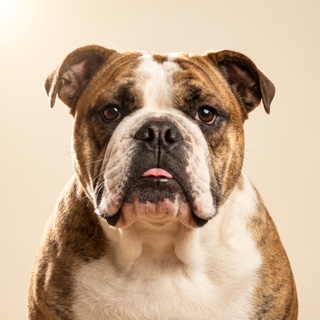
Short answer: the best pet portrait photo is a clear, well-lit, eye-level phone shot — indoor window light or outdoor shade — with sharp focus on the eyes, no filter, and enough space to include the whole subject. Avoid harsh overhead sun, motion blur, and heavily filtered images.
The best photo for a pet portrait is a clear, well-lit, eye-level phone shot with sharp focus on the eyes. You don't need a professional camera or a studio setup — the phone photo you already love is almost always enough. Five specific choices separate a great source shot from a merely usable one.
What are the five things that make a great pet portrait photo?
- Even, soft light. Window light indoors or outdoor shade beats direct sun. Overhead noon sun creates harsh shadows that flatten fur and lose eye detail. Golden hour outdoors is ideal.
- Eye-level angle. Get down to your pet's height. Photos taken looking down foreshorten the face and stretch the body — the painted portrait keeps whatever geometry the source has.
- Sharp focus on the eyes. The eyes carry the personality. If they're crisp, the painting reads as "them" even if the coat is slightly out of focus. If they're blurred, no medium can save it.
- Frame the whole subject. Close-up makes a classic head-and-shoulders portrait; full body lets us put them in a scene (Astronaut, Chef, Knight). Either works — don't crop tighter than you want the painting to end.
- Skip the filters. Instagram color grading, beauty filters, aggressive HDR — all of these fight the painting mediums. Raw camera roll photos preserve the actual tones.
Ready to see it? Try the free preview — no card, no sign-up.
Try the free preview →What resolution and format does an AI pet portrait need?
An AI pet portrait needs at least 1000px on the short edge in JPEG, PNG, HEIC, or WebP — every modern phone camera hits this in default mode. Practically:
- Resolution: anything at 1000px on the short edge or larger works. Modern phone cameras hit this in default mode. iCloud-optimized photos usually still qualify — but if you can, use the "actual size" version.
- Format: JPEG, PNG, HEIC (iPhone default), or WebP. We convert everything to a working format server-side; you don't need to convert.
- File size: up to 15MB. If your phone is capturing bigger, we compress in-browser before upload so the studio doesn't stall on slow connections.
What are the most common pet-photo mistakes (and how to fix them)?
The four photo problems that most often turn a promising source shot into a disappointing portrait are: harsh overhead sun, motion blur, cropped subjects, and heavy filters. Each has a fast fix.
Harsh overhead sun
Direct noon light creates black eye sockets and blown-out coat highlights. Move to open shade — under a tree, on a porch, or next to a bright window. Softer light means the painting has more tonal range to work with.
Motion blur
A blurry action shot rarely becomes a crisp painting. If your pet won't sit still, snap 5–10 photos in a row and pick the sharpest. Burst mode on iPhone or "Motion Photos" on Android are your friends.
Cropped-out ears or paws
The paint keeps what the photo has. If the top of the head is cut off, the portrait will show a cut-off head. Frame the shot with a little breathing room on all sides — you can always crop in later, but you can't add pixels that don't exist.
Heavily filtered images
"Vivid" or "Dramatic" iPhone filters, Snapchat filters, or beauty-mode AI enhancements fight the painting mediums by adding tones that don't exist in nature. Turn them off, or use the unfiltered original.
What about photos of pets that passed?
The most common non-standard photo we work with. If you have limited photos of a pet you lost, we can work with what you have — even lower-resolution, older, or slightly-blurry shots. Read our memorial portrait guide for how we approach it.
What if I have multiple photos?
Great problem to have. Pick the one that shows the personality — a Frenchie giving side-eye, a Golden mid-yawn, a cat in a shaft of sun. Personality photos become the best paintings because the medium amplifies whatever mood the source shot has.
If you can't decide, try two or three separate previews (they're free). Compare and pick the one where you say "that's them" without thinking.
Common questions
Do I need a professional camera or a studio setup?
No. Every portrait in our gallery started as a phone photo. The AI paint models were trained on the kinds of photos real people actually have — vacation snaps, backyard shots, mid-belly-rub grins. A DSLR helps if you have one, but it's not the difference between "great portrait" and "so-so portrait."
Can I use a screenshot from a video?
Sometimes. Screenshots from 1080p or 4K video work if the pet is in sharp focus in that specific frame. Screenshots from lower-res video (720p, older phones) tend to look soft in the painting. If it's a screenshot of a pet that passed, we work with what you have — reach out to Otis on-site if you want us to sanity-check it before you commit.
What if my pet won't hold still?
Bribes work. Treats above the phone lens, a squeaky toy just off-camera, or their favorite person calling their name. If none of that works: burst mode + pick the sharpest frame.
Can I upload multiple pets in one photo?
Yes — we can paint groups. Multi-pet photos are best for a wider material (poster or canvas) so nobody gets cropped. If you want each pet as a solo portrait too, upload each separately.
What if I don't have a great photo right now?
Wait until you do. Golden hour on your next walk, next time they nap in a sunbeam, next grooming appointment. The photo is the whole input — a good one now saves you regretting a rushed one later.